Description
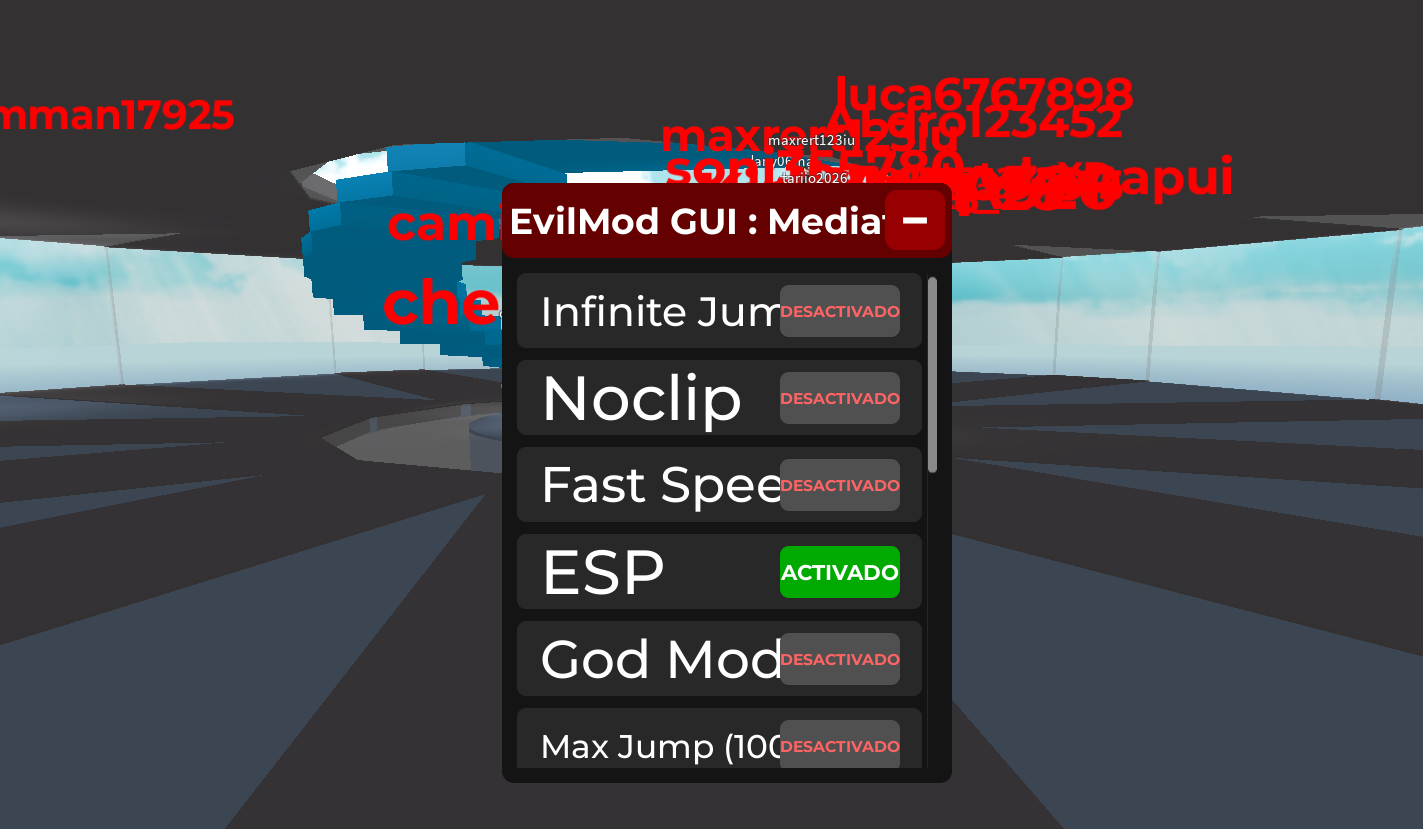
This script is a UNDETECTED, UNIVERSAL, KEYLESS script. it tries to look like happymod. it includes:
Infinite jump
Noclip
Fast Speed
Esp
God mode
Max jump (makes your jump power 1000)
i tested everything and everything works. but god mode its kinda broken.
Its keyless, free and fast to open. when u minimize it, an angry face appears, if u press it, the gui opens again just like happymod but this script is not happy today.
infinite jump: makes that u can jump infinity.
noclip: lets u go through walls.
fast speed: makes u fast
ESP: shows the name of every player on server.
god mode: makes u get a lot of health.
max jump: makes ur jump power 1000
Fun fact: u can heal yourself if you press 2 times the god mode button
Tested on these games
Natural disaster simulator (NDS) - Working.
Slap Battles - Working.
Rivals - Working.
It can run on bad pcs, it doesn't matter what you got.
Fast - Working - Universal - Undetected in a lot of games - Loads easily
running in a lot of executors like:
Solara
Xeno
Delta
and a lot more
Note: This script is based on HappyMod Roblox. That's why the name is & EvilMod : Mediafire (the name its just a joke)
Infinite jump
Noclip
Fast Speed
Esp
God mode
Max jump (makes your jump power 1000)
i tested everything and everything works. but god mode its kinda broken.
Its keyless, free and fast to open. when u minimize it, an angry face appears, if u press it, the gui opens again just like happymod but this script is not happy today.
infinite jump: makes that u can jump infinity.
noclip: lets u go through walls.
fast speed: makes u fast
ESP: shows the name of every player on server.
god mode: makes u get a lot of health.
max jump: makes ur jump power 1000
Fun fact: u can heal yourself if you press 2 times the god mode button
Tested on these games
Natural disaster simulator (NDS) - Working.
Slap Battles - Working.
Rivals - Working.
It can run on bad pcs, it doesn't matter what you got.
Fast - Working - Universal - Undetected in a lot of games - Loads easily
running in a lot of executors like:
Solara
Xeno
Delta
and a lot more
Note: This script is based on HappyMod Roblox. That's why the name is & EvilMod : Mediafire (the name its just a joke)
Script Code
LUA SCRIPT
-- EvilMod GUI : Mediafire
-- LocalScript (Place in StarterPlayer > StarterPlayerScripts)

local player = game.Players.LocalPlayer
local playerGui = player:WaitForChild("PlayerGui")

-- Create ScreenGui
local screenGui = Instance.new("ScreenGui")
screenGui.Name = "EvilModGUI"
screenGui.ResetOnSpawn = false
screenGui.Parent = playerGui

-- Main Frame
local mainFrame = Instance.new("Frame")
mainFrame.Name = "MainFrame"
mainFrame.Size = UDim2.new(0, 300, 0, 400)
mainFrame.Position = UDim2.new(0.5, -150, 0.5, -200)
mainFrame.BackgroundColor3 = Color3.fromRGB(20, 20, 20)
mainFrame.BorderSizePixel = 0
mainFrame.Visible = true
mainFrame.Parent = screenGui

local uiCorner = Instance.new("UICorner")
uiCorner.CornerRadius = UDim.new(0, 8)
uiCorner.Parent = mainFrame

local title = Instance.new("TextLabel")
title.Size = UDim2.new(1, 0, 0, 50)
title.BackgroundColor3 = Color3.fromRGB(100, 0, 0)
title.Text = "EvilMod GUI : Mediafire"
title.TextColor3 = Color3.fromRGB(255, 255, 255)
title.TextScaled = true
title.Font = Enum.Font.GothamBold
title.Parent = mainFrame

local titleCorner = Instance.new("UICorner")
titleCorner.CornerRadius = UDim.new(0, 8)
titleCorner.Parent = title

-- Minimize Button
local minimizeBtn = Instance.new("TextButton")
minimizeBtn.Size = UDim2.new(0, 40, 0, 40)
minimizeBtn.Position = UDim2.new(1, -45, 0, 5)
minimizeBtn.BackgroundColor3 = Color3.fromRGB(150, 0, 0)
minimizeBtn.Text = "−"
minimizeBtn.TextColor3 = Color3.fromRGB(255, 255, 255)
minimizeBtn.TextScaled = true
minimizeBtn.Font = Enum.Font.GothamBold
minimizeBtn.Parent = mainFrame

local minCorner = Instance.new("UICorner")
minCorner.CornerRadius = UDim.new(0, 8)
minCorner.Parent = minimizeBtn

-- Minimized Logo Frame (Angry Demon)
local minimizedFrame = Instance.new("Frame")
minimizedFrame.Name = "MinimizedFrame"
minimizedFrame.Size = UDim2.new(0, 80, 0, 80)
minimizedFrame.Position = UDim2.new(0, 20, 0.5, -40)
minimizedFrame.BackgroundColor3 = Color3.fromRGB(30, 30, 30)
minimizedFrame.BorderSizePixel = 0
minimizedFrame.Visible = false
minimizedFrame.Parent = screenGui

local logoCorner = Instance.new("UICorner")
logoCorner.CornerRadius = UDim.new(0, 12)
logoCorner.Parent = minimizedFrame

local demonLogo = Instance.new("TextLabel")
demonLogo.Size = UDim2.new(1, 0, 1, 0)
demonLogo.BackgroundTransparency = 1
demonLogo.Text = "😠"  -- Angry demon face (you can replace with ImageLabel + rbxassetid if you want)
demonLogo.TextScaled = true
demonLogo.TextColor3 = Color3.fromRGB(255, 50, 50)
demonLogo.Font = Enum.Font.GothamBold
demonLogo.Parent = minimizedFrame

local logoStroke = Instance.new("UIStroke")
logoStroke.Thickness = 3
logoStroke.Color = Color3.fromRGB(200, 0, 0)
logoStroke.Parent = demonLogo

-- Scrollable area for toggles
local scrolling = Instance.new("ScrollingFrame")
scrolling.Size = UDim2.new(1, -20, 1, -70)
scrolling.Position = UDim2.new(0, 10, 0, 60)
scrolling.BackgroundTransparency = 1
scrolling.ScrollBarThickness = 6
scrolling.Parent = mainFrame

local listLayout = Instance.new("UIListLayout")
listLayout.Padding = UDim.new(0, 8)
listLayout.SortOrder = Enum.SortOrder.LayoutOrder
listLayout.Parent = scrolling

-- Function to create toggle
local function createToggle(name, callback)
    local toggleFrame = Instance.new("Frame")
    toggleFrame.Size = UDim2.new(1, -10, 0, 50)
    toggleFrame.BackgroundColor3 = Color3.fromRGB(40, 40, 40)
    toggleFrame.Parent = scrolling

    local corner = Instance.new("UICorner")
    corner.CornerRadius = UDim.new(0, 6)
    corner.Parent = toggleFrame

    local label = Instance.new("TextLabel")
    label.Size = UDim2.new(0.7, 0, 1, 0)
    label.BackgroundTransparency = 1
    label.Text = name
    label.TextColor3 = Color3.fromRGB(255, 255, 255)
    label.TextScaled = true
    label.Font = Enum.Font.GothamSemibold
    label.TextXAlignment = Enum.TextXAlignment.Left
    label.Position = UDim2.new(0, 15, 0, 0)
    label.Parent = toggleFrame

    local button = Instance.new("TextButton")
    button.Size = UDim2.new(0, 80, 0, 35)
    button.Position = UDim2.new(1, -95, 0.5, -17.5)
    button.BackgroundColor3 = Color3.fromRGB(80, 80, 80)
    button.Text = "OFF"
    button.TextColor3 = Color3.fromRGB(255, 100, 100)
    button.TextScaled = true
    button.Font = Enum.Font.GothamBold
    button.Parent = toggleFrame

    local btnCorner = Instance.new("UICorner")
    btnCorner.CornerRadius = UDim.new(0, 6)
    btnCorner.Parent = button

    local enabled = false

    button.MouseButton1Click:Connect(function()
        enabled = not enabled
        if enabled then
            button.Text = "ON"
            button.BackgroundColor3 = Color3.fromRGB(0, 170, 0)
            button.TextColor3 = Color3.fromRGB(255, 255, 255)
        else
            button.Text = "OFF"
            button.BackgroundColor3 = Color3.fromRGB(80, 80, 80)
            button.TextColor3 = Color3.fromRGB(255, 100, 100)
        end
        callback(enabled)
    end)

    return toggleFrame
end

-- Variables for features
local connections = {}
local character = player.Character or player.CharacterAdded:Wait()
local humanoid = character:WaitForChild("Humanoid")

-- Infinite Jump
local infJumpConn
createToggle("Infinite Jump", function(state)
    if state then
        infJumpConn = game:GetService("UserInputService").JumpRequest:Connect(function()
            if humanoid then
                humanoid:ChangeState(Enum.HumanoidStateType.Jumping)
            end
        end)
    else
        if infJumpConn then infJumpConn:Disconnect() end
    end
end)

-- Noclip
local noclipConn
createToggle("Noclip", function(state)
    if state then
        noclipConn = game:GetService("RunService").Stepped:Connect(function()
            if character then
                for _, part in pairs(character:GetDescendants()) do
                    if part:IsA("BasePart") then
                        part.CanCollide = false
                    end
                end
            end
        end)
    else
        if noclipConn then noclipConn:Disconnect() end
        -- Reset collision (may need character reset)
    end
end)

-- Fast Speed
createToggle("Fast Speed", function(state)
    if humanoid then
        humanoid.WalkSpeed = state and 100 or 16
    end
end)

-- ESP (Simple Name ESP)
local espObjects = {}
createToggle("ESP", function(state)
    if state then
        for _, plr in pairs(game.Players:GetPlayers()) do
            if plr ~= player and plr.Character and plr.Character:FindFirstChild("Head") then
                local billboard = Instance.new("BillboardGui")
                billboard.Adornee = plr.Character.Head
                billboard.Size = UDim2.new(0, 200, 0, 50)
                billboard.StudsOffset = Vector3.new(0, 3, 0)
                billboard.AlwaysOnTop = true

                local text = Instance.new("TextLabel")
                text.Size = UDim2.new(1, 0, 1, 0)
                text.BackgroundTransparency = 1
                text.Text = plr.Name
                text.TextColor3 = Color3.fromRGB(255, 0, 0)
                text.TextScaled = true
                text.Font = Enum.Font.GothamBold
                text.Parent = billboard

                billboard.Parent = plr.Character.Head
                table.insert(espObjects, billboard)
            end
        end
    else
        for _, obj in pairs(espObjects) do
            obj:Destroy()
        end
        espObjects = {}
    end
end)

-- God Mode (High Health + No Fall Damage)
createToggle("God Mode", function(state)
    if humanoid then
        if state then
            humanoid.MaxHealth = 999999
            humanoid.Health = 999999
            humanoid:SetStateEnabled(Enum.HumanoidStateType.FallingDown, false)
        else
            humanoid.MaxHealth = 100
            humanoid.Health = 100
            humanoid:SetStateEnabled(Enum.HumanoidStateType.FallingDown, true)
        end
    end
end)

-- Max Jump Power
createToggle("Max Jump (1000)", function(state)
    if humanoid then
        humanoid.JumpPower = state and 1000 or 50
    end
end)

-- Minimize functionality
minimizeBtn.MouseButton1Click:Connect(function()
    mainFrame.Visible = false
    minimizedFrame.Visible = true
end)

demonLogo.InputBegan:Connect(function(input)
    if input.UserInputType == Enum.UserInputType.MouseButton1 then
        mainFrame.Visible = true
        minimizedFrame.Visible = false
    end
end)

-- Character respawn handling
player.CharacterAdded:Connect(function(newChar)
    character = newChar
    humanoid = newChar:WaitForChild("Humanoid")
end)

print("EvilMod GUI : Mediafire Loaded!")
Script Information & Compatibility
Target Game
Universal
Key Requirement
Keyless (Instant)
Supported Platform
PC / Windows
Status & Safety
Community Verified
How to Execute this EvilMod GUI (Based on HappyMod) Script
To run this Lua script safely and effectively in Universal, follow these standard steps:
- Copy the Script Code: Click the Copy Code button above to save the Lua script to your clipboard.
- Launch the Game: Start Roblox and open Universal. Wait until your character and game assets fully load.
- Attach Your Executor: Launch your preferred Lua script executor (ensure it is updated to the latest version compatible with Roblox). Click the Attach or Inject button.
- Execute the Code: Paste the copied script into your executor's code tab and press Execute. The script's graphical user interface (GUI) or features should appear on your screen.
Tip: Always test scripts on an alternate account first and avoid running multiple heavy scripts simultaneously to maintain optimal game performance.
Frequently Asked Questions
Copy the code from the code container above, open your executor inside Universal, paste the code, and click execute.
No, this script is keyless! You can run it immediately without completing any verification checkpoints or link shorteners.
Roblox updates weekly, which can temporarily break script functions. If the script does not execute, make sure your executor is fully updated, rejoin the server, and verify that your antivirus is not blocking the injector.
Related Scripts