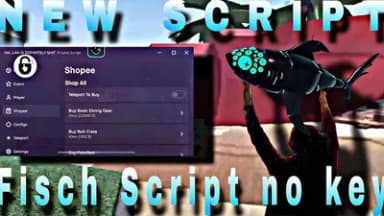
KEYLESS BEST AUTO FARM AUTO SELL TELEPORTS AND MANY MORE
Description
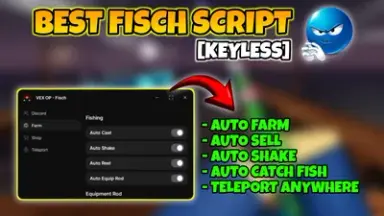
This powerful script transforms your gameplay in Fisch by automating the most time-consuming tasks. With auto farm and auto sell features, you collect resources and cash effortlessly, maximizing gains while minimizing effort.
Enjoy instant movement across the map using built-in teleports, giving you unmatched speed and convenience. No more walking or waiting - reach any location in seconds to stay ahead of the competition.
The script includes keyless execution for instant activation, so you never waste time on complex setups. Just run the loadstring command and start playing with premium perks right away.
Designed by yoursvexyyy, this premium script offers a smooth, reliable experience trusted by thousands of Roblox developers. It’s built to last, with frequent updates ensuring compatibility and performance.
Whether you're grinding for rare items or building your in-game wealth, this tool gives you a serious advantage. It’s perfect for players who want results fast, without the grind.
From new players to seasoned veterans, anyone can benefit from its easy-to-use setup and powerful automation. Take control of your Fisch journey with a script that does the work so you don’t have to.
Enjoy instant movement across the map using built-in teleports, giving you unmatched speed and convenience. No more walking or waiting - reach any location in seconds to stay ahead of the competition.
The script includes keyless execution for instant activation, so you never waste time on complex setups. Just run the loadstring command and start playing with premium perks right away.
Designed by yoursvexyyy, this premium script offers a smooth, reliable experience trusted by thousands of Roblox developers. It’s built to last, with frequent updates ensuring compatibility and performance.
Whether you're grinding for rare items or building your in-game wealth, this tool gives you a serious advantage. It’s perfect for players who want results fast, without the grind.
From new players to seasoned veterans, anyone can benefit from its easy-to-use setup and powerful automation. Take control of your Fisch journey with a script that does the work so you don’t have to.
Script Code
LUA SCRIPT
loadstring(game:HttpGet("https://raw.githubusercontent.com/yoursvexyyy/VEX-OP/refs/heads/main/fisch%20premium"))()Script Information & Compatibility
Target Game
Fisch
Key Requirement
Keyless (Instant)
Supported Platform
PC / Windows
Status & Safety
Community Verified
How to Execute this KEYLESS BEST AUTO FARM AUTO SELL TELEPORTS AND MANY MORE Script
To run this Lua script safely and effectively in Fisch, follow these standard steps:
- Copy the Script Code: Click the Copy Code button above to save the Lua script to your clipboard.
- Launch the Game: Start Roblox and open Fisch. Wait until your character and game assets fully load.
- Attach Your Executor: Launch your preferred Lua script executor (ensure it is updated to the latest version compatible with Roblox). Click the Attach or Inject button.
- Execute the Code: Paste the copied script into your executor's code tab and press Execute. The script's graphical user interface (GUI) or features should appear on your screen.
Tip: Always test scripts on an alternate account first and avoid running multiple heavy scripts simultaneously to maintain optimal game performance.
Frequently Asked Questions
Copy the code from the code container above, open your executor inside Fisch, paste the code, and click execute.
No, this script is keyless! You can run it immediately without completing any verification checkpoints or link shorteners.
Roblox updates weekly, which can temporarily break script functions. If the script does not execute, make sure your executor is fully updated, rejoin the server, and verify that your antivirus is not blocking the injector.
Comments
Login to post a comment.
Oct 18, 2025 9:18 AM
Test comment from test script
0
0
Oct 16, 2025 11:39 AM
so good script
0
0
Related Scripts