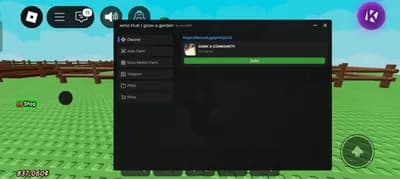
GaG Script – Auto Farm, Auto Spawner, Auto Plant, Auto Buy, Teleports

Description
This powerful script transforms how you play Grow a Garden by automating every core farming task. It collects crops, sells them instantly, and reinvests earnings without you lifting a finger.
With auto farm and auto plant, your garden stays active 24-7, even when you're offline. The auto spawner ensures rare plants appear more often, while auto buy instantly purchases upgrades when funds allow.
Teleports let you zip across the map in seconds, saving hours of walking between fields and shops. No more tedious backtracking or waiting - just pure progress and rewards.
Designed for mobile gamers, the script runs smoothly on all devices with minimal setup. Just run the loadstring command and start reaping the benefits right away.
Gamers who want to dominate the leaderboards or enjoy a relaxed experience will love this tool. It handles the grind so you can focus on building the ultimate garden empire.
The script is updated regularly by admin to stay compatible and effective. Try it today and watch your garden thrive like never before.
With auto farm and auto plant, your garden stays active 24-7, even when you're offline. The auto spawner ensures rare plants appear more often, while auto buy instantly purchases upgrades when funds allow.
Teleports let you zip across the map in seconds, saving hours of walking between fields and shops. No more tedious backtracking or waiting - just pure progress and rewards.
Designed for mobile gamers, the script runs smoothly on all devices with minimal setup. Just run the loadstring command and start reaping the benefits right away.
Gamers who want to dominate the leaderboards or enjoy a relaxed experience will love this tool. It handles the grind so you can focus on building the ultimate garden empire.
The script is updated regularly by admin to stay compatible and effective. Try it today and watch your garden thrive like never before.
Script Code
LUA SCRIPT
loadstring(game:HttpGet("https://pastefy.app/3S5kIPpY/raw", true))()Script Information & Compatibility
Target Game
Grow a Garden
Key Requirement
Key Required
Supported Platform
PC & Mobile
Status & Safety
Community Verified
How to Execute this GaG Script – Auto Farm, Auto Spawner, Auto Plant, Auto Buy, Teleports Script
To run this Lua script safely and effectively in Grow a Garden, follow these standard steps:
- Copy the Script Code: Click the Copy Code button above to save the Lua script to your clipboard.
- Launch the Game: Start Roblox and open Grow a Garden. Wait until your character and game assets fully load.
- Attach Your Executor: Launch your preferred Lua script executor (ensure it is updated to the latest version compatible with Roblox). Click the Attach or Inject button.
- Execute the Code: Paste the copied script into your executor's code tab and press Execute. The script's graphical user interface (GUI) or features should appear on your screen.
Tip: Always test scripts on an alternate account first and avoid running multiple heavy scripts simultaneously to maintain optimal game performance.
Frequently Asked Questions
Copy the code from the code container above, open your executor inside Grow a Garden, paste the code, and click execute.
Yes, this script features a key system. Upon running the script, follow the on-screen instructions in the executor GUI to obtain the activation key.
Roblox updates weekly, which can temporarily break script functions. If the script does not execute, make sure your executor is fully updated, rejoin the server, and verify that your antivirus is not blocking the injector.
Related Scripts